Technical AI discovery
How to Structure a SaaS Category Page for SEO and AI Search
Build a useful SaaS category comparison with buyer criteria, sourced product claims, pricing conditions, honest recommendations, and a reusable page brief.
In brief
- Build the shortlist around mandatory buyer requirements, plan-specific evidence and implementation tradeoffs.
- Show documented, tested and unresolved fields explicitly; put purchasing conditions beside each price.
- Use the profiles and next actions to help a buyer resolve the final selection constraint.
Sections in this article
Who this is for
Good fit
- Content teams building evidence-backed software comparisons and category pages.
Not for
- A ranked procurement shortlist for your organization without its requirements.
support team can choose the apparently best tool in a comparison and still fail its migration because attachment export was never checked. A polished feature table does not solve that problem if every cell says yes and none identifies the applicable plan, evidence or implementation work. The job of a SaaS category page is to make a defensible shortlist possible before the buyer commits.
Build the page around the buyer's sequence: category and audience, mandatory requirements, a concise comparison, product-specific fit and limitations, then the next verification step. Put the evidence beside the facts that change the decision. Use recommendations to explain tradeoffs instead of hiding them in an unexplained star score.
This guide covers an editorial category comparison. A vendor landing page, directory and two-product comparison serve different jobs; the scope section explains how to adapt the structure. A real, dated three-vendor documentation check and a fictional support-software exercise show the method at two levels. EdenRank competes in AI visibility, so the vendor check is explicitly a publisher comparison, not an independent ranking.
To make the source method concrete, we inspected three official AI-visibility pricing pages on September 8, 2026. EdenRank operates in this category, so this is a disclosed publisher comparison, not an independent product ranking. The narrow question is which listed entry plan documents enough tracked prompts for a forty-question monitoring panel. We did not purchase accounts or test collection accuracy, exports or support quality.
Peec Starter lists 50 prompts, a choice of three models, daily tracking and one project. Otterly Lite lists 15 search prompts and daily tracking. Profound Starter lists 50 tracked prompts and ChatGPT-only tracking. The dated comparison record preserves the plan, source, requirement and unresolved fields. These are documentation observations at the stated date, not permanent product limits.
For the forty-question requirement, the documented prompt allowance fits Peec Starter and Profound Starter; Otterly Lite's listed allowance does not fit without a different eligible configuration. That conclusion is conditional and narrow. It does not make the first two equally suitable: Profound Starter's listed engine scope differs, while a required export or audit feature remains unverified in this particular check. A larger prompt allowance cannot compensate for an unmet mandatory capability.
We deliberately avoid a cost-per-answer ranking because billing state, included engine coverage and counting conventions need a separate comparable record. A flattened pricing page can contain several tab states at once. A nearby feature or price must be assigned to the correct plan before it enters a recommendation. Do not multiply prompts by engines and days and present the result as observed delivered responses.
This gives a concrete shortlist decision without manufacturing a winner: advance plans that meet the documented capacity requirement, then verify the remaining mandatory fields. If a cited feature claim is ambiguous, use the source-gap audit. If the page's facts are sound but retrieval is uncertain, use the crawler diagnostic procedure. Page structure, product suitability and crawl access require different checks.
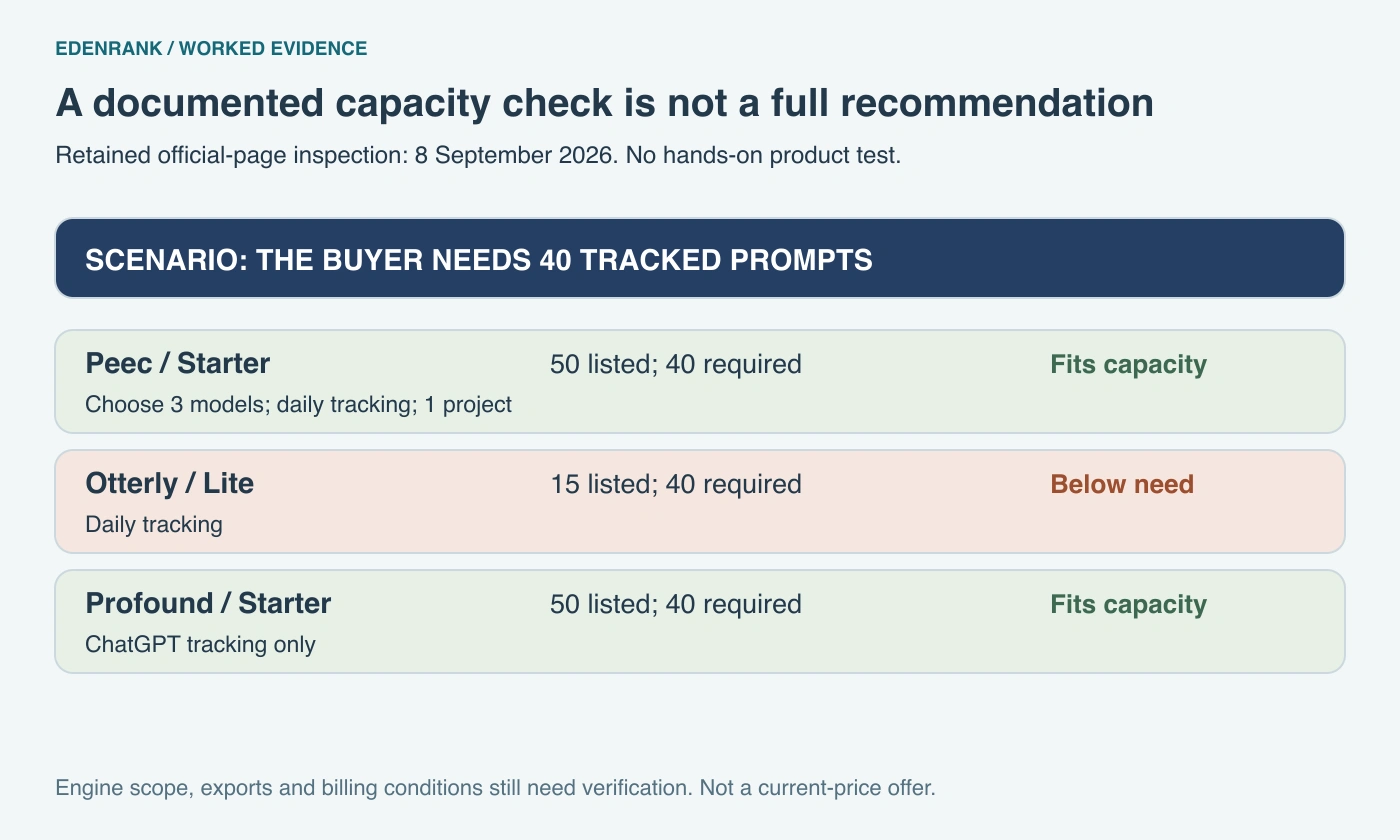
Dated plan-capacity observations for a forty-question requirement
| Documented entry plan | Prompt allowance | Forty-question requirement | Remaining decision |
|---|---|---|---|
| Peec Starter | 50 | Fits the listed allowance | Verify required engine choices and export conditions |
| Otterly Lite | 15 | Does not fit this listed allowance | Check another eligible configuration |
| Profound Starter | 50 | Fits the listed allowance | ChatGPT-only scope must fit the buyer task |
Our August 8, 2026 research folder contains a competitor matrix with product names, entry prices, capability judgments, and official URLs. That was useful research scaffolding, but several cells compressed important conditions into a single number or boolean. For this guide, we revisited two official pricing pages on September 7 rather than copying the old matrix into a new comparison.
The Peec AI pricing page lists a Starter allowance of 50 prompts, three selected models, daily tracking, and one project. The OtterlyAI pricing page lists 15 search prompts for Lite and daily tracking. These are documented allowances, not results of hands-on product testing. A prompt allowance alone does not describe identical engine coverage, geographic settings, repeated runs, or reporting exports.
The purpose of these rows is to demonstrate a current, scoped comparison record. We deliberately did not treat the old matrix's entry-price cells as current quotes. A page can contain several billing states, add-ons, and agency allowances. A responsible comparison captures the exact state it used instead of extracting the first currency amount and presenting it as the universal subscription cost.
EdenRank publishes this guide and operates in the same broad market, so readers should treat our category research as commercially interested editorial work. This small example does not rank either vendor or establish that EdenRank is superior. The source-check record names what we inspected and what remains untested. Its narrowness is useful: another editor can update the documented fields without inheriting unrelated claims from the older matrix.
The broader lesson is to distinguish a research lead from a publishable field. A boolean such as execution available needs a definition: does it mean a recommendation, a downloadable draft, an approved change, or a verified deployment? Until the definition is fixed, two true values may represent very different products. Build the field dictionary before writing a winner, then test the consequential capability in the relevant plan if the recommendation depends on it.
Retained competitor evidence and review decisions
| Field checked on September 7, 2026 | Peec AI Starter | OtterlyAI Lite | Comparison consequence |
|---|---|---|---|
| Listed prompt allowance | 50 | 15 | Define required prompt inventory first |
| Listed tracking cadence | Daily | Daily | Compare actual run settings separately |
| Price used in this worked comparison | Not quoted | Not quoted | Verify selected billing and add-ons before a cost decision |
| Evidence type | Official pricing documentation | Official pricing documentation | Documentation review, not a product benchmark |
See where your brand appears in AI answers - and where it does not.
Run a first-party brand check across supported answer engines. Results are measured without a promised citation or conversion. Browse all free tools
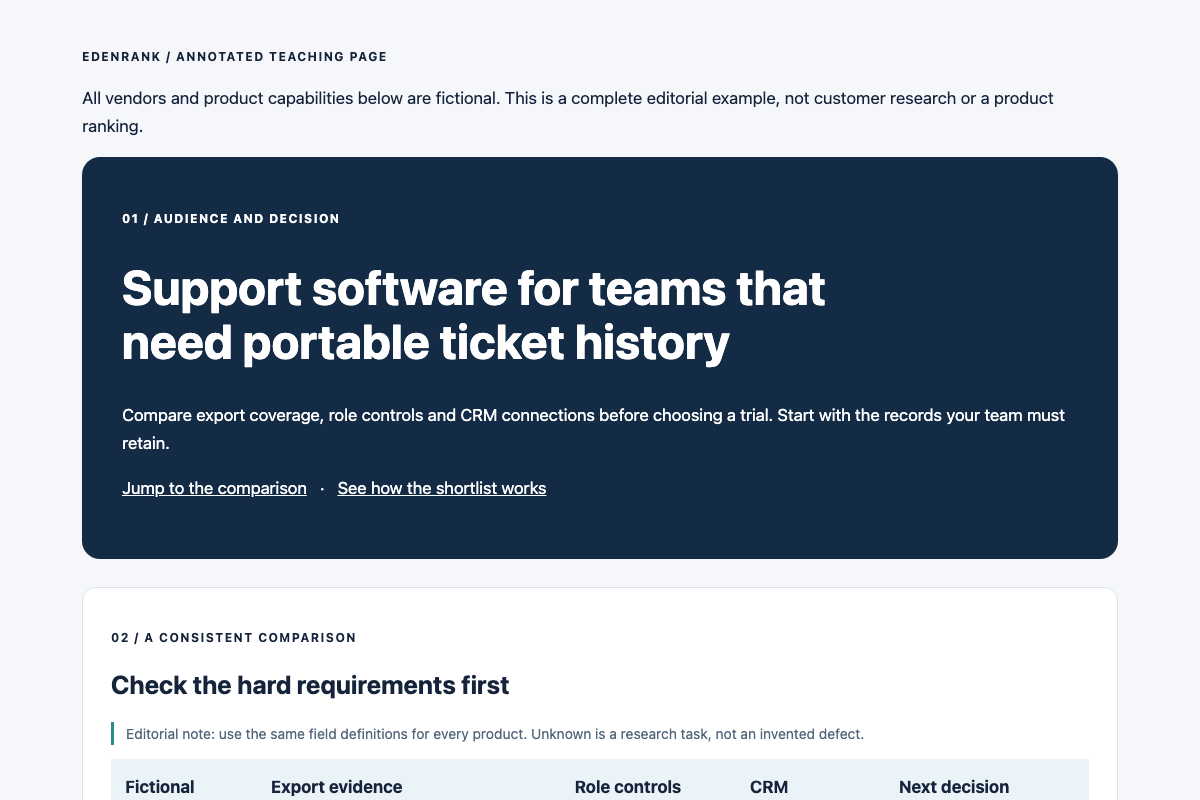
The downloadable annotated category-page example is a complete static page built for this guide. It is a teaching artifact using fictional support-software products, not a published customer page or a performance case study. Open it in a browser to see the reading order, comparison table, product profile, method, limitations, and next action together. Its annotations explain the editorial job of each block.
The first screen names one audience and one buying task: support teams choosing software when ticket and attachment portability is mandatory. Its introduction explains what the comparison includes and provides a direct jump to the shortlist. This is more precise than a generic best-software headline followed by a signup form. The reader can decide immediately whether the page addresses their constraint.
The comparison table then provides the same fields for every candidate: required export evidence, access controls, integration method, and next verification step. It does not add decorative star scores. A short methodology note identifies which details are documented, tested, or unknown. On mobile, the table scrolls inside its own labelled region rather than widening the entire page.
A model product profile can read: Vendor C is a candidate for a support team that needs the stated export coverage and role controls and can accommodate an API-based CRM connection. The next step is to estimate implementation effort with the team's actual integration owner. This is a conditional shortlist statement, not a universal endorsement. A buyer requiring a native connector should take a different path through the same evidence.
The final call to action is a verification worksheet rather than a premature purchase demand. It asks the buyer to select a plan, supply a representative export, test required records, and obtain a written answer for any unresolved limitation. For your real page, replace the fictional product details and attach the evidence before removing the teaching label. Keep the structure if it helps the buyer; do not retain a criterion merely because it appears in the example.
Use the complete category-page brief to hand this to a writer or designer. It includes the actual section order, sample opening copy, field definitions, profile requirements, disclosure placement, and acceptance checks. The page is ready for review when someone can trace one recommendation from buyer requirement through evidence to the next action without asking the author what a cell meant.
Define the category in ordinary language before introducing a list of vendors. Explain the core job, the adjacent categories that might be confused with it, and the situations where a different approach would fit better. For support software, a shared inbox, a ticketing system, and a customer-data platform can overlap without being interchangeable. The page should help the reader recognize the distinction.
Identify the buyer constraints that materially change a recommendation. Team size can matter, but workflow often matters more: how requests arrive, whether external customers need a portal, which records must be retained, and who administers the system. A broad claim such as best for every small business is less useful than a recommendation tied to an explicit workflow and its limitations.
Disclose who publishes the page and any commercial relationship relevant to the comparison. A vendor can publish a useful comparison of its own product with alternatives, provided the relationship is clear and the evidence standards are consistent. An affiliate relationship should not be hidden behind a generic editorial-team byline. Explain whether placement, inclusion, or compensation affects the ordering.
State exclusions as part of the scope. If the page covers cloud-hosted tools with an English-language interface, say so. If on-premises products or enterprise-only contracts are outside the research, identify that boundary. An exclusion is not a negative product claim. It tells readers when the shortlist is insufficient for their needs.
Lead with a short definition and a navigation path into the comparison. Follow with a compact table, then product profiles that explain the important tradeoffs. Place the selection method and evidence policy close enough that a reader can inspect them before accepting a recommendation. Finish with implementation considerations, unresolved questions, and a next step appropriate to the buyer's stage.
Some readers arrive knowing their preferred products; others need a category introduction. Use section links and descriptive headings to serve both. You do not need to detect the visitor's intent or rewrite the introduction dynamically. A visible jump link to the comparison and a separate category explanation can provide clear routes through one stable page.
Use a table for fields that are genuinely comparable. Use prose for exceptions, nuance, and the reason a field matters. A row cannot explain every deployment constraint, and a long paragraph makes repeated comparison difficult. The two formats complement each other. Avoid claiming that retrieval systems discard prose or require a particular number of columns; the article has no evidence for such a rule.
Make the main answer accessible before asking for a signup, demo, or download. A comparison table that exists only inside an image or gated file creates unnecessary work for readers. A downloadable copy can be valuable as a procurement worksheet, but the page itself should still contain the criteria, conclusions, and evidence needed to understand the recommendation.
Start with the decisions a buyer must resolve rather than a list of features that favors the publisher's product. For support software, useful criteria could include supported request channels, assignment rules, export coverage, role controls, required integrations, and the pricing unit. A criterion belongs in the main comparison when it changes a plausible buyer's choice and can be evaluated consistently.
Define each field before researching vendors. Integration available is ambiguous: it could mean a native connector, a partner connector, an API, or a manual file exchange. Separate those states. Export available is similarly incomplete unless the field identifies which records, attachments, or metadata are included. A clear definition prevents one vendor's marketing language from setting a weaker standard than another's documentation.
Do not impose an arbitrary maximum number of criteria on every category. Keep the first table scannable, then move detailed requirements into a secondary matrix or linked worksheet. A security-sensitive buyer may need more detail than a solo operator. The page should organize that detail rather than pretend it is irrelevant because it does not fit a compact layout.
Decide how to represent uncertainty. Use documented, tested under stated conditions, not found in reviewed sources, and needs vendor confirmation where appropriate. Not found is not the same as absent. Unknown fields should not receive a favorable score, but neither should they be presented as verified defects. The reader needs to know what question remains open.
Buyer criteria and evidence requirements
| Criterion | Field definition | Evidence to retain |
|---|---|---|
| Export coverage | Record types and fields included | Export documentation or inspected sample |
| Integration method | Native, partner, API, or manual | Exact integration documentation |
| Access controls | Roles and available restrictions by plan | Plan-specific permissions reference |
| Pricing unit | Seat, usage, workspace, or negotiated | Pricing page with date and conditions |
| Deployment fit | Hosting options and relevant region scope | Current product documentation |
Store the product, plan, claim, source URL, checked date, and exact limitation behind each comparison field. Link to the page supporting the claim rather than to the vendor's homepage. If the claim comes from a first-hand test, record the test conditions and distinguish them from the vendor's broader promise. A successful test of one export file does not validate every plan or dataset.
Treat absence claims with particular care. A feature omitted from a pricing table may be documented elsewhere or available through a negotiated plan. Write not documented in the sources reviewed when that is all the evidence establishes. If the missing feature is a hard buyer requirement, recommend obtaining confirmation before making a selection rather than turning the gap into a confident rejection.
When sources conflict, record both and identify the unresolved point. A help article may lag a product release; a pricing page may describe eligibility without implementation details. The comparison should not quietly choose whichever wording makes its preferred vendor look strongest. Resolve the discrepancy through further evidence or mark the field unknown until the conflict is settled.
Keep the public wording proportionate to the evidence. A vendor's security page is evidence of what the vendor states, not proof that your team conducted a security audit. A case study is not your own measured result. A screenshot can support a dated observation, but it should be accompanied by the relevant text and source context so readers can inspect its meaning.
A price is useful only with its purchasing conditions. Record currency, billing interval, annual commitment, minimum seats, included usage, overage terms where documented, and the check date. Name the exact plan. Keep an advertised monthly equivalent under annual billing distinct from a subscription that can actually be purchased month to month.
For a worked calculation, consider a fictional plan priced at $20 per seat per month, billed annually, with a five-seat minimum. The minimum base commitment is $20 × 5 × 12 = $1,200 per year before any applicable taxes or separately charged services. A two-person team does not have a $40 monthly option under those stated conditions. The arithmetic is illustrative; these are not a real vendor's prices.
Put the decisive condition directly in the comparison cell: “$20/seat/month equivalent; annual billing; minimum five seats.” Link to the exact plan source, and place detailed usage and add-on conditions in the profile. The reader should not need to open several footnotes to discover that the advertised starting price does not fit the proposed team.
When a pricing page contains monthly and annual tabs, record the selected state with the plan. Flattened HTML can place a number near the wrong feature list. If you cannot establish the state, leave the price unresolved and give the buyer a specific question to confirm. Preserve earlier price records as history; update the current comparison after a new inspection rather than overwriting the historical source date.
Give each profile the same factual backbone and a distinct recommendation. Start with who should consider the product, then explain the evidence for the relevant requirements. State the principal limitation and the step that would resolve a pending decision. A feature catalogue is less useful than an answer to “Would this meet the stated requirements, and what remains to verify?”
For fictional Vendor C in the comparison below, a useful profile reads: “Consider Vendor C when the required export and role controls matter more than a native CRM connector. Its documented integration route is an API, so the shortlist remains conditional on your team's ability to implement and maintain the field mapping. Test the required identifiers and attachment handling before committing.” This recommendation follows the scenario's evidence rather than declaring the product best for everyone.
Use a different conclusion for Vendor A: “Keep Vendor A pending until attachment export is confirmed.” That is not the same as “Vendor A cannot export attachments.” The distinction tells the buyer what to ask and prevents missing documentation from becoming an invented product defect.
End each profile with the relevant action: inspect an export, verify a plan restriction, test an integration or start a trial. If the product already fails a mandatory requirement, explain that condition before inviting the reader to a demo. The profile and comparison row should lead to the same shortlist decision.
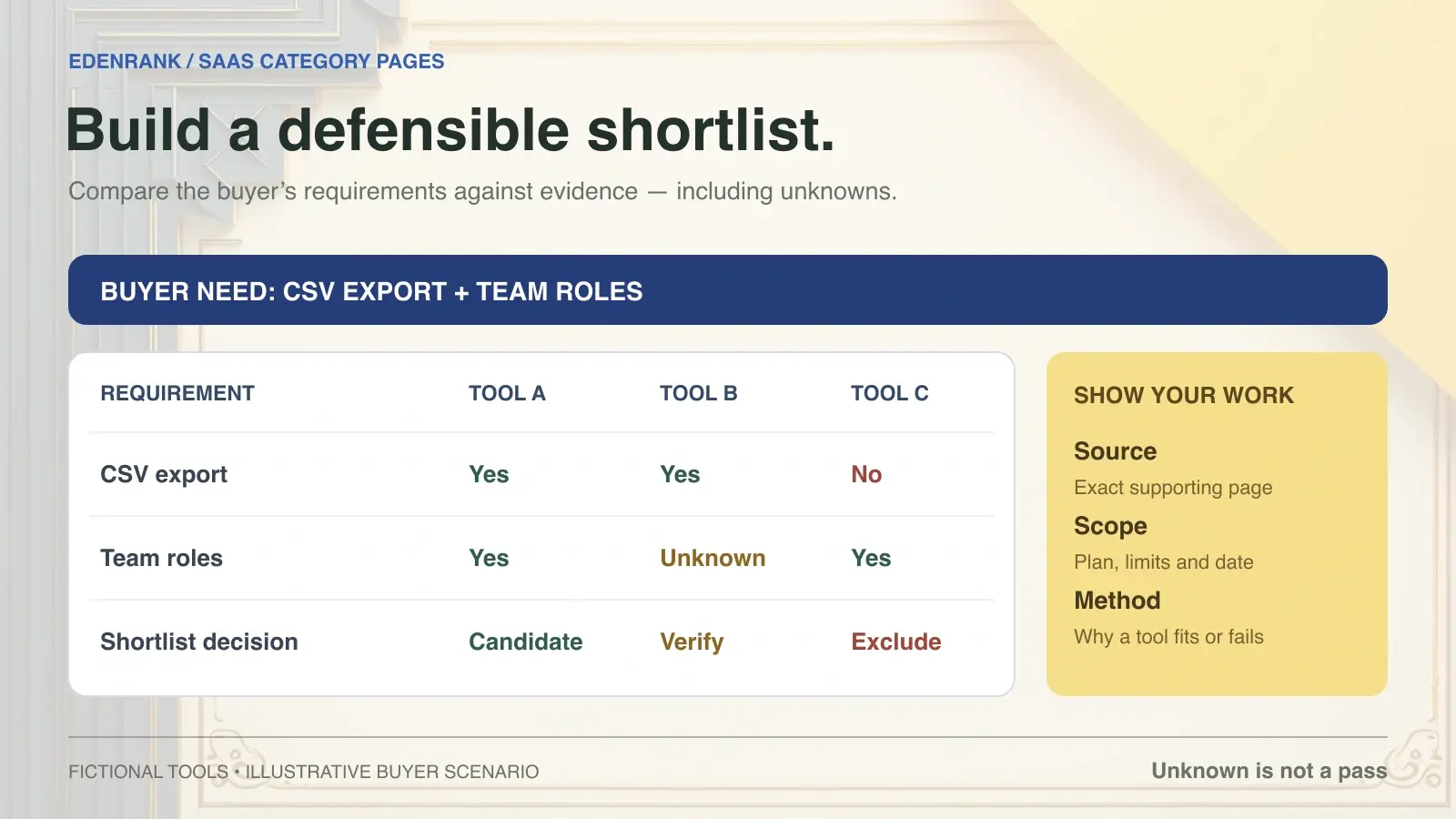
Imagine a support team that needs email intake, role-based access, and export of tickets plus attachments. Those are hard requirements in this teaching scenario. A preference for a native CRM integration matters only after the hard requirements are resolved. The three fictional vendors below are deliberately incomplete so the example demonstrates what to do with unknown evidence.
Vendor A documents ticket export but says nothing about attachments in the reviewed source. Vendor B documents both ticket and attachment export, but role controls require a plan outside the team's stated budget. Vendor C documents role controls and export coverage, while its CRM connection is API-based. No vendor should be declared a universal winner from this small example.
The shortlist decision is conditional. Vendor C can proceed to an integration-effort check; Vendor A needs evidence before qualifying; Vendor B fails the current budget constraint unless that constraint changes. None of these conclusions requires a fabricated numerical score. The reader can inspect the criteria and disagree with the stated budget or integration preference without disputing the underlying facts.
The comparison record preserves that separation between evidence and judgment. Replace every fictional entry before using it for a live procurement decision. The accompanying page brief turns the record into headings, comparison fields, and a review checklist.
Fictional support-software shortlist
| Fictional vendor | Export evidence | Role controls | CRM connection | Scenario decision |
|---|---|---|---|---|
| Vendor A | Tickets documented; attachments unknown | Documented on candidate plan | Native connector documented | Confirm attachment export |
| Vendor B | Tickets and attachments documented | Available above stated budget | Native connector documented | Reassess budget or exclude |
| Vendor C | Required export documented | Documented on candidate plan | API-based | Evaluate integration effort |
A category page may make recommendations or publish rankings. The useful question is whether the method, evidence, and scope support them. Define the target scenario, hard exclusions, criteria, and any weighting. Explain how unknown fields are treated and disclose the publisher's relationship to the products. A reader should understand why changing a requirement could change the recommendation.
Use hard constraints before preference scoring. A tool that cannot satisfy a mandatory requirement should not win because it scores highly on unrelated conveniences. If the requirement is unknown rather than disproven, mark the candidate pending verification. This produces a more honest shortlist than awarding an average score that conceals a potentially decisive gap.
If you use weighted scores, publish the definitions and underlying observations. Describe the score as your editorial model rather than a market fact. Do not turn a subjective preference score into AggregateRating markup or imply that it represents customer reviews. A calculated score can help organize a decision, but only if its meaning stays visible.
Include sensitivity in the explanation. A buyer who needs native integration may prefer a different option than a buyer with an engineering team. Show that switch condition in ordinary language. Recommendations become more trustworthy when their boundaries are visible, not when the page insists that one product remains best under every possible scenario.
Use real HTML text for the definition, product names, criteria, and conclusions. Tables should have headers, meaningful captions, and a mobile scrolling region where necessary. Keep each cell concise, and move long qualifications into a linked profile. Test keyboard access and narrow screens so a buyer can compare values without losing the row or column context.
Filters should enhance an already useful page. Do not require a user to perform several interactions before any product information exists in the rendered content. If a directory spans multiple pages, provide navigable URLs and links. Google's pagination guidance explains discovery considerations for paginated and incrementally loaded content; use the pattern that fits the actual directory.
Google's ecommerce URL-structure guidance discusses the crawl problems created by unnecessary URL variation. Apply that principle to a software directory: choose stable category URLs and control near-identical filter combinations. Keep genuinely distinct subcategories when they serve different buyer tasks. A page for regulated deployment constraints can merit its own evidence and comparison; a duplicate page differing only by a word order usually does not add equivalent value.
Check image loading, link destinations, and page behavior after a content update. A screenshot can show a workflow clearly, but essential comparison facts should remain available as text. Relevant visuals may support understanding; they are not merely decoration inserted to satisfy an SEO checklist. A working page is part of the deliverable, not a separate concern after the writing is finished.
Select structured data according to the page's content and purpose. An editorial guide can use Article. A category collection can be described with CollectionPage, and an actual list can use ItemList. Those vocabulary choices do not, by themselves, establish eligibility for a special Google result or an AI citation.
If a page describes an individual software application, review Google's SoftwareApplication documentation for the applicable feature requirements. Do not manufacture prices, review counts, or ratings to satisfy an example. A roundup containing several products should not pretend that the whole page is a single software application with one shared offer.
Keep markup aligned with visible facts. A price, publisher, product identity, or review claim that exists only in JSON-LD is a discrepancy to investigate. Validate syntax, vocabulary, and the relevant platform requirements separately. Google's structured-data policies make clear that valid structured data does not guarantee a rich result.
Maintain a record of the fields and their evidence rather than treating a validator pass as the end of the work. The monthly structured-data checklist provides that process. A schema change should improve truthful description of the page; it should not become a shortcut around missing comparison research.
Define the category page's intended business action: a useful product-detail visit, a qualified trial, a demo request, or another observable step. Measure it with the source and denominator your analytics actually supports. A click to a vendor is not a purchase, and a demo request is not a qualified opportunity unless your business has verified that qualification.
Track search performance by page and relevant query groups where available. Compare like periods and annotate changes to product scope, title, layout, and offers. A broader set of recorded queries can indicate broader visibility, but it is not proof that the page ranks for every phrase in your research inventory. Keep keyword estimates and observed query performance distinct.
For AI measurement, save answers from a stable set of discovery and comparison prompts. Record mention and owned-domain citation independently, with branded and non-branded prompts separated. If an answer names a vendor from your table but cites another source, the page has not earned that citation. Inspect the actual linked URL rather than crediting any answer that resembles your wording.
A category page becomes more useful when it answers what happens after a buyer chooses a tool. Subscription price is only one part of a comparison. Separate recurring fees, one-time migration work, implementation effort and requirements that remain unverified. Do not hide a failed mandatory requirement inside an average score.
Use a buyer-supplied horizon and workload. For a constructed example, a team might compare twelve months of subscriptions, twenty hours of onboarding and an estimated export-cleanup task. Those are planning inputs, not measured vendor costs. State who supplied the estimates and show the calculation so the buyer can replace them.
Keep “best category tools,” “A versus B” and “alternatives to A” distinct. The category page establishes the shortlist criteria. A versus page can examine two shortlisted products in depth. An alternatives page should explain the constraint that makes the existing product unsuitable and the migration tradeoff of each replacement. Link between these pages when that next decision is useful; repeating the same comparison table on every URL gives the buyer little additional evidence.
If the buyer asks whether to build or buy, identify the maintenance owner, expected integrations and acceptable operating burden before estimating development. A generic category guide cannot supply a defensible engineering estimate. Record that missing input explicitly rather than making a purchased subscription look cheaper through an invented internal-build cost.
Implementation questions before purchase
| Decision question | Evidence to request | How to present an unresolved answer |
|---|---|---|
| Can we move existing records? | Supported import formats and a representative import test | Migration compatibility not tested |
| Can we leave later? | Export scope, format and a sample export | Exit workflow not verified |
| Will our team have the right access? | Role documentation and the applicable plan | Required permission not confirmed |
| Does it fit our security requirements? | Current vendor material and buyer review | Security review pending |
| Will integrations preserve required fields? | Mapping documentation and a test result | Integration listed; field behavior untested |
Publish a brief method note with the page: intended buyer, inclusion criteria, research date, documented-versus-tested distinction and publisher relationships. Keep the detailed source register available to the editorial owner. A correction should update the comparison row, profile, recommendation and any marked offer that uses the same fact.
Trigger review when a plan changes, a product launches, a source breaks or a reader reports a mismatch. A scheduled pass catches quieter drift. In that pass, have a reviewer choose one candidate and reconstruct its shortlist decision from the sources. If the reviewer cannot tell which plan was evaluated or why an unknown requirement was accepted, repair the record before adding more products.
Close with the next decision the page actually supports. A qualified shortlist can lead to a trial. An unresolved export requirement should lead to a vendor question or a sample test. Use the measurement guide to evaluate those actions after publication, and preserve the comparison's purpose: helping a buyer make a choice they can explain.
Checklist
- Define the category and buyer scenario
- Disclose commercial relationships and exclusions
- Apply consistent criterion definitions
- Retain exact sources and plan conditions
- Keep unknowns separate from verified limitations
- Retest sources and page behavior after updates
Use the guide
Build a requirement register
Work through the example with your own inputs. Add rows to the register, then download your work before leaving this page.
Research next: keep the claim unresolved and name the evidence needed.
0/100 rows saved in this page. Inputs are not sent to a server.
FAQ
Must a SaaS comparison use a table?
A table is helpful for consistent criteria, while prose explains conditions and tradeoffs. Neither format guarantees AI citation. Choose the combination that lets the intended buyer understand and verify the comparison.
May a category page rank products?
Yes, with a visible scenario, method, evidence, and commercial disclosure. Treat rankings as scoped editorial judgments, handle unknowns explicitly, and explain which buyer requirements would change the recommendation.
Should prices be omitted because they change?
No. Include verified prices when useful, together with currency, billing interval, commitment, plan conditions, and checked date. Mark unresolved costs honestly and update known errors when discovered.
Does a missing feature on a pricing page prove it is absent?
No. Record that the feature was not documented in the sources reviewed. Check relevant product documentation or obtain confirmation before treating that gap as a verified limitation.
What should appear above the comparison table?
State the category, intended buyer and decision, then disclose the publisher relationship and provide a jump link. The annotated example page shows the complete sequence.
How do I update an old competitor matrix?
Recheck each consequential field at its source. Retain the plan, billing state and date; replace broad yes/no fields with definitions. Keep a historical record separate from a current product recommendation.
What should a SaaS comparison include beyond subscription price?
Include the buyer’s implementation, migration, permissions, integration and exit requirements. Separate documented capabilities from tested behavior and keep estimated switching costs labelled as estimates.
How should I show an annual plan with a seat minimum?
State the monthly equivalent, annual commitment and minimum seats together. Calculate the minimum base commitment from those conditions, and identify any separate taxes or services rather than presenting the per-seat number as the whole bill.
What to remember
Build the shortlist around mandatory buyer requirements, plan-specific evidence and implementation tradeoffs.
Show documented, tested and unresolved fields explicitly; put purchasing conditions beside each price.
Use the profiles and next actions to help a buyer resolve the final selection constraint.
References and further reading
These links are provided for direct inspection. A reference is not treated as proof of every statement in this article.
- 1.Peec AI pricing pagepeec.ai
- 2.OtterlyAI pricing pageotterly.ai
- 3.Profound Startertryprofound.com
- 4.pagination guidancedevelopers.google.com
- 5.ecommerce URL-structure guidancedevelopers.google.com
- 6.CollectionPageschema.org
- 7.ItemListschema.org
- 8.SoftwareApplication documentationdevelopers.google.com
- 9.structured-data policiesdevelopers.google.com
Written by
EdenRank Editorial Team
The product and editorial team documents repeatable ways to inspect AI-answer visibility, source evidence, and content operations.
Expertise
Want insights like this for your own brand?
Talk to the teamKeep building the topical graph.
How to Find Source Gaps in AI-Generated Answers: A Technical Audit
A technical audit method for locating where AI-generated answers lack proper source backing.
AI Crawler Check: Find Exactly Where AI Bots Stop Reading You
Use the crawl path to locate the specific stage behind a missing result instead of treating invisibility as one problem.
How to Optimize Schema Markup for AI Engines, Not Just Google
Schema tuned only for Google's star ratings and FAQ dropdowns can still leave an AI engine unable to tell who you are. Here is the schema that actually resolves entity identity.